Mod Loader
The Mod Loader is a small add-on for the Ryzom client. It adds a /mods command and loads the mods you choose. No game files are patched and nothing needs to be compiled. Tested with Omega / v26.09.416.

 Download modloader.zip · 13 KB5 downloads
You only do this once.
 1. Close the Ryzom client
It reads these files when it starts, so it must not be running.
 2. Find your game folder
- Windows: the folder that holds
ryzom_client_r.exe. For the Steam version it is something likeC:\Program Files (x86)\Steam\steamapps\common\Ryzom. - macOS:
~/Library/Application Support/Ryzom/0. This is notRyzom.app: the app only holds read-only game data. The folder you want holdsclient.cfg,userandsave. The0is the default profile. - Linux: usually
~/.ryzom/0.
- Windows: the folder that holds
 3. Open the
userfolderIt is inside the game folder. If there is no
userfolder yet, create one.- 4. Unzip
modloader.zipinto itYou should end up with these three files:
user/
  commands2.xml
  modloader.lua
  mods/
    modloader_list.lua
The loader owns
commands2.xml, so unzipping replaces anycommands2.xmlyou already have inuser. Keep a copy first if it holds anything of yours.On Windows, a folder under
Program Filesmay ask for administrator permission when you save files into it. Allow it. - 5. If you start the game from %APPDATA%
On Windows the client can also run from
%APPDATA%\Ryzom, which has its ownuserfolder. If you start Ryzom that way, put the same files there too.  6. Start the client and log in
In the system info channel you should see this line, because the list of mods is still empty:
[Mods] 0 of 0 mods running. Type /mods for details.Type
/modsand it answers[Mods] no mods loaded. That means the loader works. If you see nothing, see Troubleshooting.
Do this for each mod. Every mod has its own page in the catalogue, with its zip and its id.
- 1. Download the mod's zip
For example
tracker-0.13.0.zip. - 2. Close the client
Mods are read when the client starts.
- 3. Unzip it into the same
userfolderThe zip already contains the
modsfolder, so the mod lands inuser/mods/tracker/.user/ mods/ tracker/ tracker_mod.lua ... - 4. Add it to the list
Open
user/mods/modloader_list.luain a text editor and put the mod's id, in quotes, inside the braces. Separate several ids with commas:ModLoader.installed = { "tracker", "mappins" }Keep the comment line at the top if you like. A mod that is unzipped but not in the list does not load.
- 5. Start the client and log in
The loader now counts the mods it started:
[Mods] 2 of 2 mods running. Type /mods for details./modslists each mod with its version and status, for example[Mods] Harvest Tracker 0.13.0 (tracker): running. - 6. Open the mod
Type the mod's command, such as
/tracker, or click its button on the Mod Menu bar (the Mod Menu is a mod too,menu). If you close the bar,/modmenubrings it back.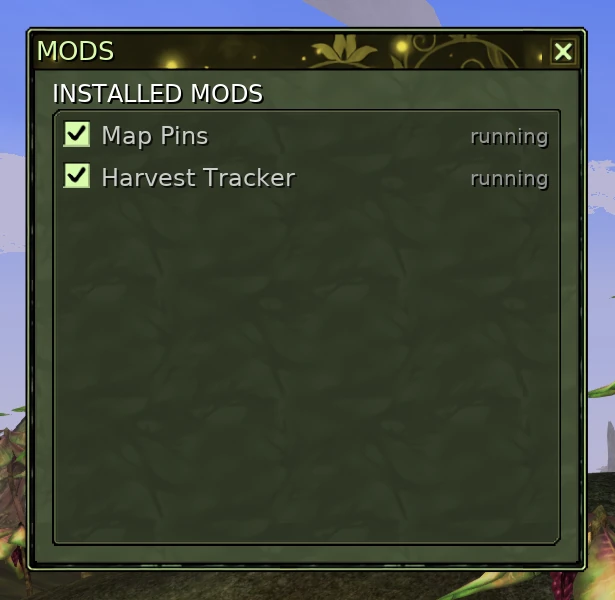
The MODS window lists each installed mod and whether it is running. It opens with the cog button on the Mod Menu bar.
- 1. Close the client
As before.
- 2. Download the new zip and unzip it over the old one
Unzip into the same
userfolder and let your system replace the files. The list inmodloader_list.luastays as it is. - 3. Start the client and type /mods
The version in the list should be the new one. If it is still the old one, the copy in the game folder is stale, or the loader found a different
user/modsfolder first: the line[Mods] mods folder: ...says which one it used. On Windows, check%APPDATA%\Ryzom\user\modsfor an older copy.
You can switch a mod off without deleting anything:
- In game, type
/mods off tracker. The loader answers that it will not load next time the client starts./mods on trackerswitches it back on. - Or untick it in the MODS window, opened with the cog button on the Mod Menu bar. Either way it takes effect when the client restarts, because Lua cannot be unloaded while the game runs.
To remove it for good, close the client, take its id out of modloader_list.lua and delete the folder user/mods/<id>/. To remove the loader itself, delete the files you unzipped (commands2.xml, modloader.lua and the mods folder) and put back any commands2.xml you kept.
- Nothing appears at login. The loader never ran. Check that
commands2.xmlandmodloader.luaare in theuserfolder of the same folder the client runs from, then look inclient.logfor XML or Lua errors. [Mods] no mod list found (...)The loader could not readuser/mods/modloader_list.lua. Check that the file is there and that it still has the line startingModLoader.installed =.[Mods] <id> failed: ...The message says what went wrong; the same text shows in/mods. Often the mod was not unzipped into the right place: look foruser/mods/<id>/<id>_mod.lua. One broken mod does not stop the others.- The mod is not in the count. Its id is missing from, or misspelt in,
modloader_list.lua. window layout changed, restart the client to apply itA mod's window changed while the game was running. Restart the client.- Old version after updating. See Updating a mod.